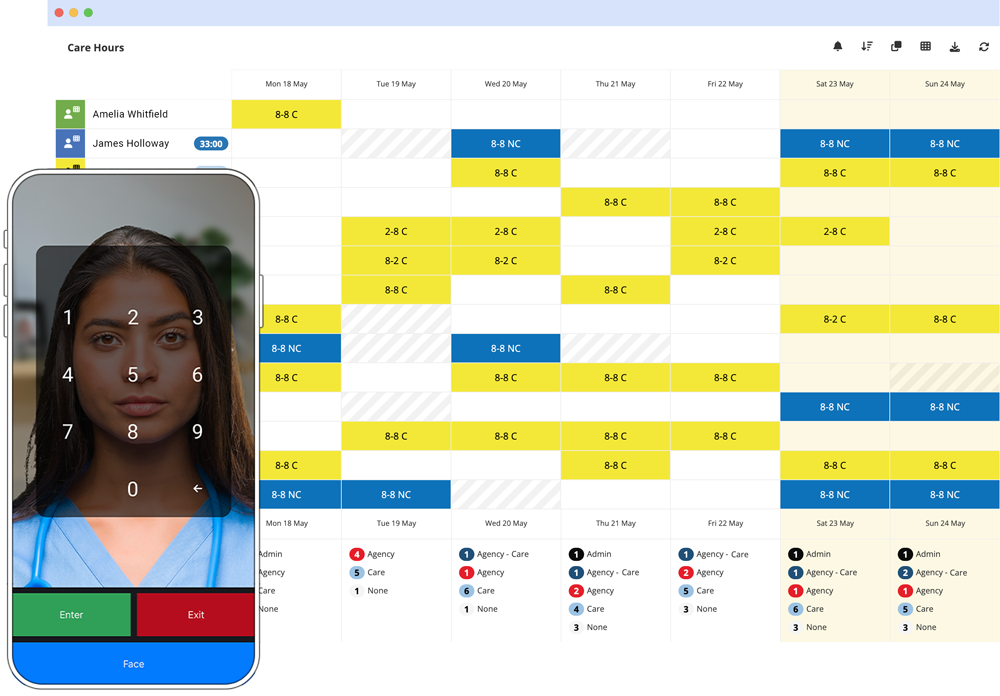
Absence Management Software
Track sickness, calculate real Bradford scores, and spot absenteeism patterns before they hit payroll - or just ask the AI.
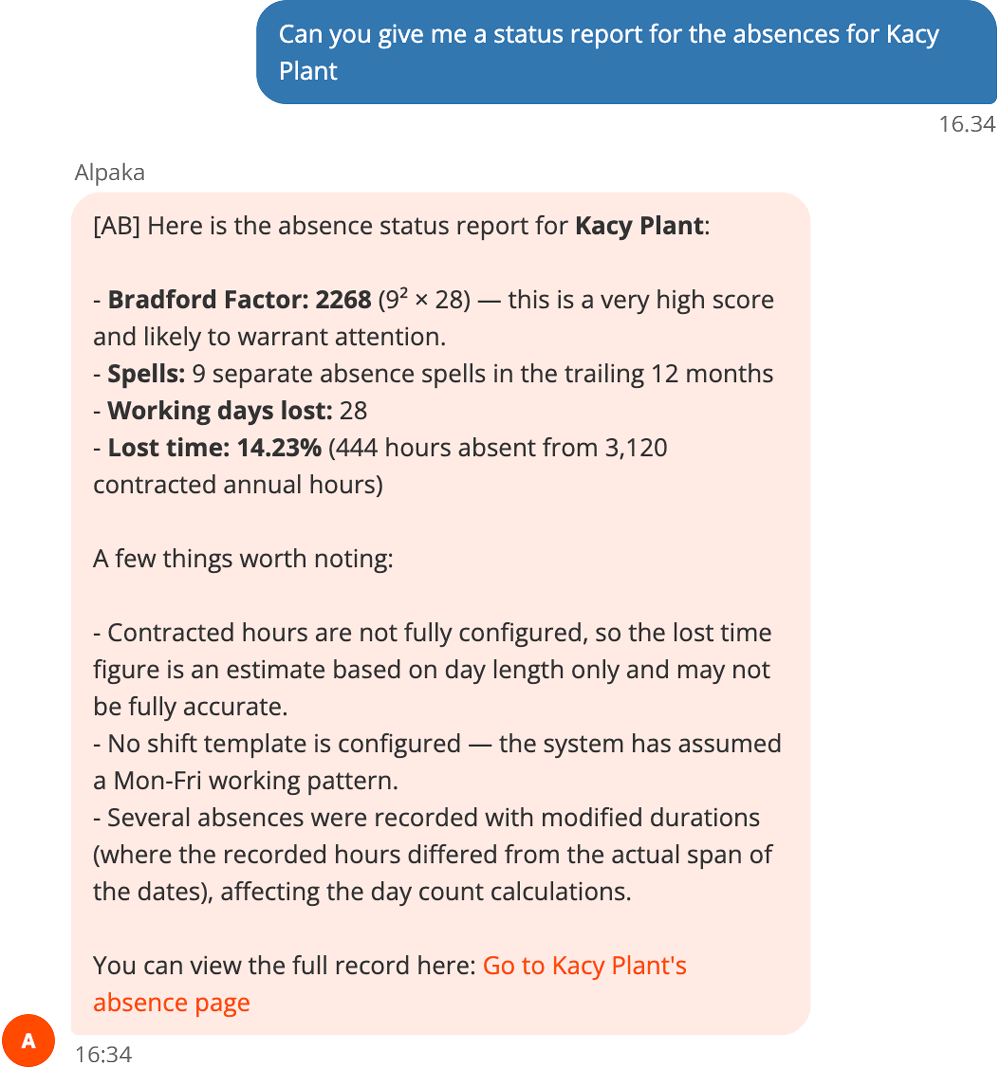
Built-in AI Absence Specialist
Ask the AI Absence Specialist a plain question about someone's attendance, and it works through the numbers properly: the Bradford Factor comes with the actual calculation behind it, not just a score. If anything it's telling you rests on an assumption - hours that haven't been fully configured, a shift pattern it's had to guess at - it says so before you act on it, and links straight through to the full record so you can check.
Absence reports are all still there
Absence also lives on its own pages - full absence records, notifications, reports broken down by person, team or period. The AI chat is for when you want an answer fast; the reports are for when you want to dig through the detail yourself.
- Sickness and non-attendance tracking
- Lost time % calculated automatically
- Bradford factor scores - explained simply
- Automated notifications to managers
- Absence reports by individual, team or period
Absence Overview
A real Alpaka client's absence data, walked through live: filtering by seniority, site and department, spotting lateness and self-isolation patterns, and drilling into individual lost-time rates compared against site, department and manager averages.
Read video transcript
You might be expecting a professional scripted presentation at this point. Enterprise-grade software does demand such a thing usually, but I prefer to replace the polish with some passion when giving a real-world example. I believe it demands a real movie.
So on screen, we will go through the data from a real Alpaka client, how it relates to absence in the way that they measure and record and present absence information. And at all times, the names that you see here will be anonymized. These are fake names, as you can probably tell already if you take a close look at some of the nonsense in there.
So Alpaka is a utility for measuring time, and it's non-prescriptive, which means you can configure the types of time, and therefore types of absence, that you wish to record and report on and make use of in your views and charts. Now, being non-prescriptive, it means you can build something that better reflects your company policies or the way your HR department runs, or the expectations that your team already have of how this already works in your workplace. So when you move to a product like Alpaka, the road is less bumpy, and everything still seems familiar to them as we move along.
On screen, we can see we have the wider team ordered by seniority down and a date range of December 20 to September 21. Now, I want to filter down to only look at the kinds of time that we understand to be absence. So we've got sickness absence, lateness - I want to take a look at that. I'm also keen to see how self-isolation has been used by this team.
So we're ordered by seniority here, and as you can see, amongst my managers, we don't have what looks like a lot of white space, means we don't have an absence problem amongst our senior managers. I can see one there that I'm interested in - Bonnie had an example of lateness, 10:15. We'll see more about Bonnie later. And here we've got Robin has only one day of isolation at the weekend as well. And Manuel has got a four-day period of isolation there. So it's clear my managers or my upper management structure don't have a problem with absence.
So let's take a look at Site C and see if that's any different. Yeah, more to see here. So my team at Site C, we've got someone here, Avery, with a long-term sickness absence. There's Bonnie with her lateness - she works at Site C. And we've got a little bit of self-isolation, but actually, because of the color scheme, I can see self-isolation isn't prolific amongst this site, and therefore, they must have been following the guidance about staying distanced from each other because it hasn't gone through this site like you might expect.
So let's actually compare by department instead. Department C would have meant something to them, but again, it's been anonymized. I don't know what B or C are. I'm going to find one sooner or later that actually has quite a lot of absence in it. But in fact, the company as a whole doesn't have a problem with absence.
So instead of looking by department, why don't I look by hourly paid part-time staff? And there we go, and you can see there's a lot more on screen. There's the first 25 of 62 members of my team, which their type is that they're hourly paid part-time. And as you can see, part-timers tend to have more sickness absence than full-timers. Let's have a look there. Yep, see? It disappears - white space.
So somewhat anecdotally there, not quite so scientific - at a glance, I can tell that my part-time teams have more absence due to sickness than my full-time teams. And do with that information what you will.
Moving on to one of the other views, a useful part of Alpaka is Presence, and that is our clocking in and out app, which forms the timesheets that go to payroll, all automated so that nobody has to write a paper timesheet anymore. They just clock in and out simply with the app.
Now, the best way that that works is driven from our rotas. Where people are rotad, we know of their expectation to come to work, and therefore, when they fail to show, they join this list, which is the missing from our presence. So Lyle here was expected from 9:00 to 5:00 on Wednesday, the 24th of February, and by 9:00, he would still be in this list on Wednesday, and this list would have been everybody at the start of the day. If I was the first to arrive at perhaps 7:00 a.m. and I stare at this list, everybody is in it. But as people arrive, one by one, they will disappear from this list, and I want the list to be entirely gone by 9:00, when everybody should have started work.
And what we can see here is that Lyle is still in this list because they were late. In fact, they were late by seven and a quarter... good old Lyle. Oh, no, that's minutes. Sorry - seven minutes and 15 seconds. Okay, great. So these people are still in the list because they were late, and we ought to create a lateness for them. And perhaps 16 seconds late isn't very fair, and so I'll skip that one. But there's no evidence at all that Margie and Shelley and Jake turned up. So what I need to do is create an absence for them of any kind right here on this page.
Why is Jake permanently a problem to me on my missing list? So I'm going to visit Jake's page and go to his absence record. And we can see he's had eight hours. Let's take a look at this in terms of months instead. So in May, he had eight hours of sickness, which is probably only one day's work, 12 hours in November, and compassionate leave in February. Okay, so Jake's record is not terrible. And in fact, look, 1.5% of Jake's contracted time over this year was lost to absence. And he's from Site E, and other people from Site E average 11.8%. So in fact, Jake's one of Site E's winners. And amongst his department, it's 5.5%, which is low, but not as low as Jake, so he's still doing all right.
Jake's manager is Gina, and amongst Gina's team, the average is 7.8%. Again, Jake's still a low number, and so he's one of the better performers with regard to absence in her team. And he's an hourly paid, full-time member of staff, of whom 7.8% is the lost time rate there.
Now, let's take a look at someone with a worse record than Jake. And I made a note earlier, Bonnie was the person that had the lateness, wasn't she? Bonnie - there we go. And bless her, there's Bonnie. She had 14 hours isolating in October and one hour sickness absence. The color draws my eye to the lateness - she was two hours late in December. Again, I don't think that's a hanging offense, but we'd have to know more about Bonnie to know whether or not she just missed something. Two hours is way too late - that's not missing the bus, that's being badly informed, so I guess she must have missed a schedule email or a rota instruction or whatever she would've received to tell her she was due at work.
And we can see all kinds of absence here. So Bonnie's lost time rate, unfortunately, is high - it's 13.5%. And there again are those comparisons amongst her site colleagues, her department colleagues, Bonnie's manager, and her hourly paid part-time colleagues.
So everything you've seen is downloadable. When I created that lateness for Jake, what it may have done - here's one of the features that automates and saves everybody time - is that Alpaka can create automated messaging, either by email or notification, when something happens. So you can see here we're recording isolation in terms of hours. Now, that's the non-prescriptive part of Alpaka - these guys decided to record self-isolation in hours instead of days or minutes.
Now, one of the other things that they may have configured for self-isolation is that it creates a return-to-work templated email and sends it not only to Bonnie in this case, but also Bonnie's boss, Lyle. Or in fact, the most senior manager in the HR team who is responsible for Lyle. So there's all kinds of automations available for you to configure and decide.
You can invent your own kinds of absence to better match your company policies. And all the information is available all the time for you to make good use of data to make good decisions and react in an appropriate way to how your company is experiencing absence or time away from work.
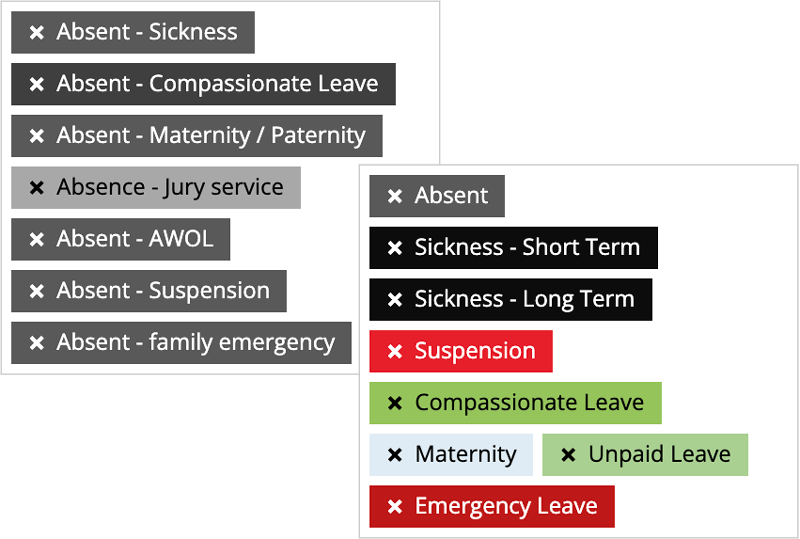
Absence types that match how you actually work
Sickness, unauthorised absence, compassionate leave - set up the categories your policies actually use, not whatever a generic system assumes.
Each type carries its own rules: what counts as a return-to-work trigger, whether it feeds into the Bradford Factor or lost-time percentage, and whether it's allowed to clash with a shift or another absence already on the books. Sickness might count toward Bradford; compassionate leave usually shouldn't. It's all set once, against how your business actually runs, and setting it up stays quick.
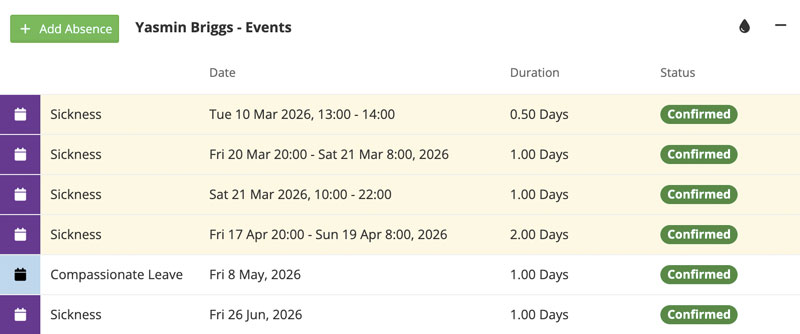
Every event, in one place
Every absence lands on a single timeline, attached to the person it belongs to - not scattered across a spreadsheet, a notice board, and someone's memory.
A manager reviewing a case sees the whole history at a glance: dates, type, duration, and what was logged at the time. When a return-to-work conversation happens, the record's already there - nobody's reconstructing it from memory.
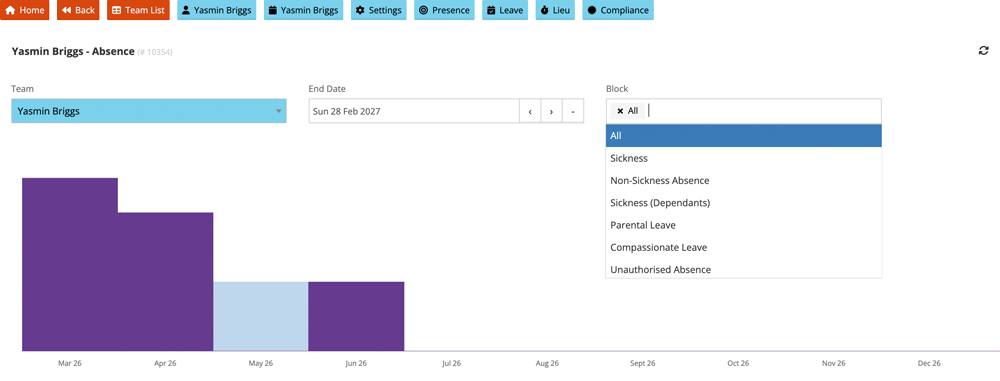
When absence happens, not just how much
A single number hides when things actually happened. This breaks a person's absence down month by month and by type - sickness on its own, or just unauthorised absence - so a cluster in spring, or a run of Mondays, shows up as a shape instead of a total buried in a report.
See the individual against the average
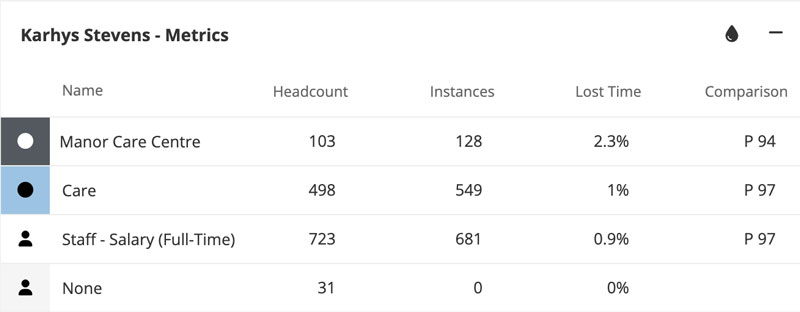
A Bradford score on its own tells you someone's absence is costly. Alpaka also shows where they sit against several different groups, from their immediate team up to the whole staff base, each one shown as a percentile with the group's size sitting right next to it. A 97th percentile out of 700 people reads differently to a 97th percentile out of five.
That's the difference between "this looks bad" and "this looks bad, and here's whether it's a pattern worth a conversation or just normal variation for this team." The comparison is what turns a number into something you can actually act on.
Three ways to get started
Try it yourself
A 5-minute guided walkthrough of Alpaka, no setup required, no data. Best if you'd rather get hands-on before talking to anyone.
Book a live demo
Talk it through with a solution specialist - not a salesperson. Ideal if you've got specific questions or want to see how Alpaka fits your setup.
Sign up free
Start right away - no credit card, no setup fees. The quickest route if you already know what you're after.